
I created a chrome extension where any LLM with image input capabilities can browse the web like a human. It can view the page, fill in forms and click on things. It runs in a loop: Take a screenshot, analyze it, decide where to click with coordinates or where to type in text, repeat.
Showcase
The browser extension gets started and then used in the sidebar. It knows how to search on eBay directly with an URL parameter. And the LLM scrolls down to see more search results until it finds what I told it to.
The browser extension can be controlled through a golang CLI application that opens a web socket listener on port 8765.
The main command is simply ./websocket-cli "go to wikipedia". Clear the context with either Clear chat in the frontend or ./websocket-cli "/clear". Stop the current loop with Stop or with ./websocket-cli "/stop".
I used it with opencode zen. GLM 5.3 Flash and DeepSeek V4.1 Flash both support the /chat/completions endpoint, so they can be used with the extension. I got an API key from opencode zen and put this key and the base URL https://opencode.ai/inference/openai/v1 into the extension.
LLMs are insane
It was very weird to see the LLMs starting to browse the web as instructed by me. It tries extensively to use the limited tools I gave it. At first it only had click capabilities so it would click through eBay categories until it arrived where I instructed it. With typing capabilities it would search for websites, and use search on those sites. With the added ability to go to specific URLs it would often just use them to search. I told it go to the wiki article of Z.AI and it would directly use https://en.wikipedia.org/w/index.php?search=Z.AI which redirects to the article.
There is no huge system prompt necessary, LLMs just understand tool usage very well. They can just be dropped into any environment, told what is going on, what tools they have, and what should be accomplished. They will try whatever they can do to accomplish the stated goal. What we can influence is make them more intelligent, give them better tools, and create actual guardrails. Not just something like "Don't send money from the users bank account" in the system prompt, but stop the extension when the LLM wants to access an online banking URL. My extension has no safety built in, except it will stop after 10 turns, unless more turns are specified. Probably don't run it in your main browser profile with your cookies.
Maybe safety should be handled similar to a company. Some type of Separation of Concerns: Payments above certain thresholds need to be approved, code is reviewed before being pushed to prod. The person or department making purchase decisions is not the one handling invoices. And Meta Muse should not have your credit card and your amazon wishlist, even if this could achieve a 100 percent conversation rate of instagram ads.
This is the system prompt for my chrome extension: https://github.com/MICHAELscrypt/browser-use-llm/blob/main/visual-browser-agent/background.js#L734
Code
I decided to use screenshots to parse web pages because parsing DOM structures or reading raw HTML is not how humans see the web. Converting the web pages into markdown or similar can be error prone if the website fights against it or the website is not mainly text. That is why I decided to use a screenshot-analyze-action loop for this experiment.
The code was generated with ChatGPT and DeepSeek V4.1 Flash. With small adjustments by hand from me. The extension and the web socket CLI is on Github: Github/michaelscrypt/browser-use-llm
I'm using the chrome.debugger API. Taking screenshots with Page.captureScreenshot, and issue mouse clicks and scrolling with Input.dispatchMouseEvent, and to input text with Input.insertText. There are issues with things like hover states, since the extension only clicks on things, it does not hover. But overall the mouse clicks might look similar to a real user, at least from a websites perspective.
Chrome extension docs: browser.debugger | API - Chrome for Developers
Cost
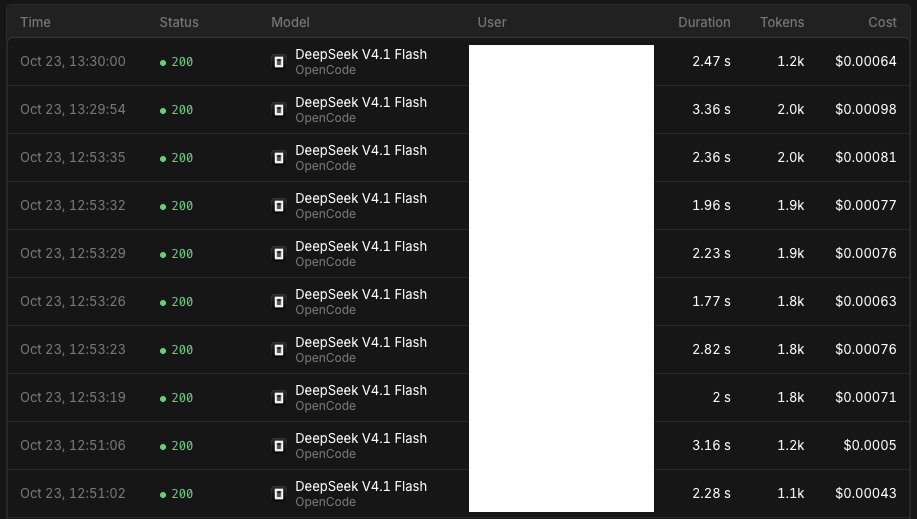
It's very cheap to use for regular browsing. At least when using GLM 5.3 Flash and DeepSeek V4.1 Flash on opencode zen. One loop (screenshot - analyze - action) takes 1k - 2k tokens and costs ¢0.1, so if something uses 10 loops it costs around ¢1.
For spamming or scraping it is probably not cost-effective, considering you would need residential IPs and the hardware for full chrome instances.